An evolving language - and a lifelong learning process
The R universe is continuously evolving, offering more than just its original base functions. Over time, modern tools and more elegant programming styles have become integral. In the upcoming chapters, we will introduce some of these new tools, along with the basics required to use them effectively.
The tidyverse
Many of the tools introduced here come from the tidyverse – a collection of packages developed by Hadley Wickham and his team. This collection offers numerous ways to improve programming skills. In this book, only the functions that are directly used will be covered. A major advantage of the tidyverse is that with a single command – library(tidyverse) – all functions in the package collection become available.
The ggplot2 package
The ggplot2 package, first released by Hadley Wickham in 2007, has become one of the most popular R packages because it significantly simplifies the creation of attractive graphics. The package history can be found here, and an introduction with links to various tutorials is available here.
The tibble package
A tibble is an enhanced version of a data.frame offering several improvements. The most notable improvement is that tibbles avoid the common data.frame behavior of unexpectedly converting strings into factors. Although tibbles are relatively new here, they will be used throughout the rest of the book.
To create a tibble from a regular data.frame (or a similar structure), the as_tibble command can be used:
dat <- data.frame(a = c(1, 2, 3), b = c(4, 5, 6))
d <- as_tibble(dat)
d
# A tibble: 3 × 2
a b
<dbl> <dbl>
1 1 4
2 2 5
3 3 6The magrittr package - pipes
Magrittr helps organize steps applied to the same dataset by using the pipe operator %>%. This operator links multiple operations on a data structure, such as a tibble, making it easier to perform tasks like calculating the sum of all numbers in the dataset:
After the pipe operator %>%, the next function automatically takes the piped-in data as its first input, so it’s unnecessary to specify it explicitly. Additional commands can be chained by adding more pipes, allowing for building more complex workflows, as shown in examples later.
The tidyr package
The tidyr package offers helpful functions for organizing data. The KA_weather dataset from chillR will be used here to illustrate some of these functions:
library(chillR)KAw <- as_tibble(KA_weather[1:10,])
KAw# A tibble: 10 × 5
Year Month Day Tmax Tmin
<int> <int> <int> <dbl> <dbl>
1 1998 1 1 8.2 5.1
2 1998 1 2 9.1 5
3 1998 1 3 10.4 3.3
4 1998 1 4 8.4 4.5
5 1998 1 5 7.7 4.5
6 1998 1 6 8.1 4.4
7 1998 1 7 12 6.9
8 1998 1 8 11.2 8.6
9 1998 1 9 13.9 8.5
10 1998 1 10 14.5 3.6pivot_longer
The pivot_longer function reshapes data from separate columns (like Tmin and Tmax) into individual rows. This transformation is often necessary for tasks like plotting data with the ggplot2 package. The function can be combined with a pipe for a streamlined workflow:
KAwlong <- KAw %>% pivot_longer(cols = Tmax:Tmin)
KAwlong# A tibble: 20 × 5
Year Month Day name value
<int> <int> <int> <chr> <dbl>
1 1998 1 1 Tmax 8.2
2 1998 1 1 Tmin 5.1
3 1998 1 2 Tmax 9.1
4 1998 1 2 Tmin 5
5 1998 1 3 Tmax 10.4
6 1998 1 3 Tmin 3.3
7 1998 1 4 Tmax 8.4
8 1998 1 4 Tmin 4.5
9 1998 1 5 Tmax 7.7
10 1998 1 5 Tmin 4.5
11 1998 1 6 Tmax 8.1
12 1998 1 6 Tmin 4.4
13 1998 1 7 Tmax 12
14 1998 1 7 Tmin 6.9
15 1998 1 8 Tmax 11.2
16 1998 1 8 Tmin 8.6
17 1998 1 9 Tmax 13.9
18 1998 1 9 Tmin 8.5
19 1998 1 10 Tmax 14.5
20 1998 1 10 Tmin 3.6pivot_wider
The pivot_wider function allows for the opposite transformation of pivot_longer, converting rows back into separate columns:
KAwwide <- KAwlong %>% pivot_wider(names_from = name)
KAwwide# A tibble: 10 × 5
Year Month Day Tmax Tmin
<int> <int> <int> <dbl> <dbl>
1 1998 1 1 8.2 5.1
2 1998 1 2 9.1 5
3 1998 1 3 10.4 3.3
4 1998 1 4 8.4 4.5
5 1998 1 5 7.7 4.5
6 1998 1 6 8.1 4.4
7 1998 1 7 12 6.9
8 1998 1 8 11.2 8.6
9 1998 1 9 13.9 8.5
10 1998 1 10 14.5 3.6select
The select function allows users to choose a subset of columns from a data.frame or tibble:
# A tibble: 10 × 3
Month Day Tmax
<int> <int> <dbl>
1 1 1 8.2
2 1 2 9.1
3 1 3 10.4
4 1 4 8.4
5 1 5 7.7
6 1 6 8.1
7 1 7 12
8 1 8 11.2
9 1 9 13.9
10 1 10 14.5filter
The filter function reduces a data.frame or tibble to just the rows that fulfill certain conditions:
# A tibble: 5 × 5
Year Month Day Tmax Tmin
<int> <int> <int> <dbl> <dbl>
1 1998 1 3 10.4 3.3
2 1998 1 7 12 6.9
3 1998 1 8 11.2 8.6
4 1998 1 9 13.9 8.5
5 1998 1 10 14.5 3.6mutate
The mutate function is essential for creating, modifying, and deleting columns in a data.frame or tibble. For example, it can be used to add new columns, such as converting Tmin and Tmax to Kelvin:
# A tibble: 10 × 7
Year Month Day Tmax Tmin Tmax_K Tmin_K
<int> <int> <int> <dbl> <dbl> <dbl> <dbl>
1 1998 1 1 8.2 5.1 281. 278.
2 1998 1 2 9.1 5 282. 278.
3 1998 1 3 10.4 3.3 284. 276.
4 1998 1 4 8.4 4.5 282. 278.
5 1998 1 5 7.7 4.5 281. 278.
6 1998 1 6 8.1 4.4 281. 278.
7 1998 1 7 12 6.9 285. 280.
8 1998 1 8 11.2 8.6 284. 282.
9 1998 1 9 13.9 8.5 287. 282.
10 1998 1 10 14.5 3.6 288. 277.To delete the columns created with mutate, you can set them to NULL:
# A tibble: 10 × 5
    Year Month   Day  Tmax  Tmin
   <int> <int> <int> <dbl> <dbl>
 1  1998     1     1   8.2   5.1
 2  1998     1     2   9.1   5
 3  1998     1     3  10.4   3.3
 4  1998     1     4   8.4   4.5
 5  1998     1     5   7.7   4.5
 6  1998     1     6   8.1   4.4
 7  1998     1     7  12     6.9
 8  1998     1     8  11.2   8.6
 9  1998     1     9  13.9   8.5
10 1998 1 10 14.5 3.6Next, the original temperature values will be replaced directly with their corresponding Kelvin values:
# A tibble: 10 × 5
    Year Month   Day  Tmax  Tmin
   <int> <int> <int> <dbl> <dbl>
 1  1998     1     1  281.  278.
 2  1998     1     2  282.  278.
 3  1998     1     3  284.  276.
 4  1998     1     4  282.  278.
 5  1998     1     5  281.  278.
 6  1998     1     6  281.  278.
 7  1998     1     7  285.  280.
 8  1998     1     8  284.  282.
 9  1998     1     9  287.  282.
10  1998     1    10  288.  277.
arrange
The arrange function sorts data in data.frames or tibbles:
# A tibble: 10 × 5
    Year Month   Day  Tmax  Tmin
   <int> <int> <int> <dbl> <dbl>
 1  1998     1     5   7.7   4.5
 2  1998     1     6   8.1   4.4
 3  1998     1     1   8.2   5.1
 4  1998     1     4   8.4   4.5
 5  1998     1     2   9.1   5
 6  1998     1     3  10.4   3.3
 7  1998     1     8  11.2   8.6
 8  1998     1     7  12     6.9
 9  1998     1     9  13.9   8.5
10  1998     1    10  14.5   3.6
It can also sort in descending order:
# A tibble: 10 × 5
    Year Month   Day  Tmax  Tmin
   <int> <int> <int> <dbl> <dbl>
 1  1998     1    10  14.5   3.6
 2  1998     1     9  13.9   8.5
 3  1998     1     7  12     6.9
 4  1998     1     8  11.2   8.6
 5  1998     1     3  10.4   3.3
 6  1998     1     2   9.1   5
 7  1998     1     4   8.4   4.5
 8  1998     1     1   8.2   5.1
 9  1998     1     6   8.1   4.4
10  1998     1     5   7.7   4.5
Loops
Understanding loops is essential for efficient coding. Loops enable the repetition of operations multiple times without needing to retype or copy-paste code. There are two primary types of loops: for loops and while loops.
For loops
In a for loop, explicit instructions dictate how many times the code inside the loop should be executed, based on a vector or list of elements:
for (i in 1:3) print("Hello")[1] "Hello"
[1] "Hello"
[1] "Hello"This code executes the loop three times, printing “Hello” each time. A more complex example uses multiple lines inside curly brackets:
addition <- 1

for (i in 1:3)
{
  addition <- addition + 1
  print(addition)
}
[1] 2
[1] 3
[1] 4You can also use a variable such as i in more creative ways within the loop:
[1] "Hello Paul"
[1] "Hello Mary"
[1] "Hello John"
While loops
A while loop continues until a condition is no longer met:
cond <- 5

while (cond > 0)
{
  print(cond)
  cond <- cond - 1
}
[1] 5
[1] 4
[1] 3
[1] 2
[1] 1apply functions
R offers a more efficient way to perform operations on multiple elements simultaneously using functions from the apply family: apply, lapply, and sapply. These functions require two key arguments: the list of items to apply the operation to and the operation itself.
sapply
The sapply function is used to apply an operation to a vector:
func <- function(x) x + 1
sapply(1:5, func)
[1] 2 3 4 5 6lapply
The lapply function returns a list as the output, even if the input is a vector:
lapply(1:5, func)[[1]]
[1] 2
[[2]]
[1] 3
[[3]]
[1] 4
[[4]]
[1] 5
[[5]]
[1] 6apply
The apply function is designed for arrays, allowing operations to be performed either on rows (MARGIN = 1) or columns (MARGIN = 2):
Exercises on useful R tools
- Based on the
Winters_hours_gapsdataset, usemagrittrpipes and functions of thetidyverseto accomplish the following:
- Convert the dataset into a
tibble
- Convert the dataset into a
- Select only the top 10 rows of the dataset
WHG <- as_tibble(Winters_hours_gaps[1:10, ])
WHG
# A tibble: 10 × 6
Year Month Day Hour Temp_gaps Temp
<int> <int> <int> <int> <dbl> <dbl>
1 2008 3 3 10 15.1 15.1
2 2008 3 3 11 17.2 17.2
3 2008 3 3 12 18.7 18.7
4 2008 3 3 13 18.7 18.7
5 2008 3 3 14 18.8 18.8
6 2008 3 3 15 19.5 19.5
7 2008 3 3 16 19.3 19.3
8 2008 3 3 17 17.7 17.7
9 2008 3 3 18 15.4 15.4
10 2008 3 3 19 12.7 12.7- Convert the
tibbleto alongformat, with separate rows forTemp_gapsandTemp
- Convert the
To see the difference between the columns Temp_gaps and Temp, rows 279 to 302 (Julian Day 15) are used below:
WHG <- as_tibble(Winters_hours_gaps[279:302, ])
WHGlong <- WHG %>% pivot_longer(cols = Temp_gaps:Temp)
WHGlong
# A tibble: 48 × 6
Year Month Day Hour name value
<int> <int> <int> <int> <chr> <dbl>
1 2008 3 15 0 Temp_gaps 6.76
2 2008 3 15 0 Temp 6.76
3 2008 3 15 1 Temp_gaps 6.48
4 2008 3 15 1 Temp 6.48
5 2008 3 15 2 Temp_gaps 5.51
6 2008 3 15 2 Temp 5.51
7 2008 3 15 3 Temp_gaps 6.89
8 2008 3 15 3 Temp 6.89
9 2008 3 15 4 Temp_gaps 6.10
10 2008 3 15 4 Temp 6.10
# ℹ 38 more rows- Use
ggplot2to plotTemp_gapsandTempas facets (point or line plot)
- Use
ggplot(WHGlong, aes(Hour, value)) +
  geom_line(lwd = 1.5) +
  facet_grid(cols = vars(name)) +
  ylab("Temperature (°C)") +
  theme_bw(base_size = 15)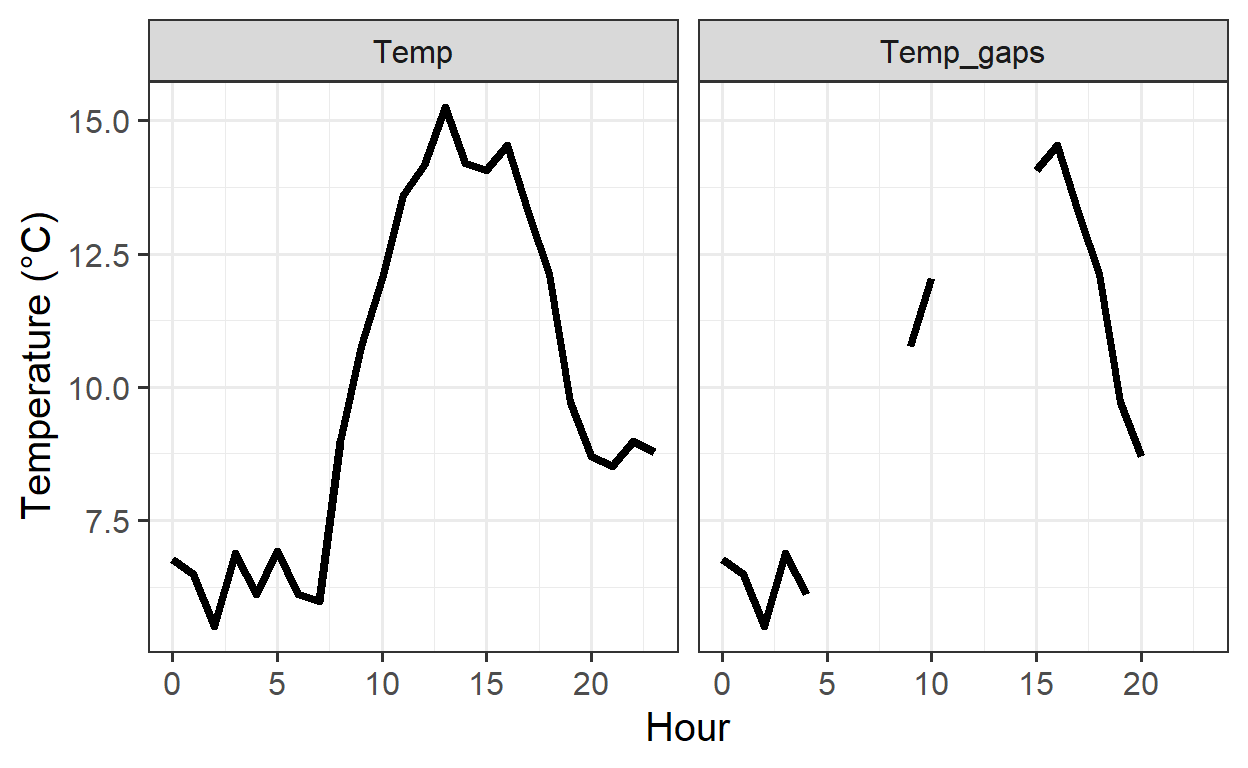
- Convert the dataset back to the
wideformat
- Convert the dataset back to the
WHGwide <- WHGlong %>% pivot_wider(names_from = name)
WHGwide
# A tibble: 24 × 6
Year Month Day Hour Temp_gaps Temp
<int> <int> <int> <int> <dbl> <dbl>
1 2008 3 15 0 6.76 6.76
2 2008 3 15 1 6.48 6.48
3 2008 3 15 2 5.51 5.51
4 2008 3 15 3 6.89 6.89
5 2008 3 15 4 6.10 6.10
6 2008 3 15 5 NA 6.91
7 2008 3 15 6 NA 6.10
8 2008 3 15 7 NA 5.98
9 2008 3 15 8 NA 8.99
10 2008 3 15 9 10.8 10.8
# ℹ 14 more rows- Select only the following columns:
Year,Month,DayandTemp
- Select only the following columns:
# A tibble: 24 × 4
    Year Month   Day  Temp
   <int> <int> <int> <dbl>
 1  2008     3    15  6.76
 2  2008     3    15  6.48
 3  2008     3    15  5.51
 4  2008     3    15  6.89
 5  2008     3    15  6.10
 6  2008     3    15  6.91
 7  2008     3    15  6.10
 8  2008     3    15  5.98
 9  2008     3    15  8.99
10  2008     3    15 10.8
# ℹ 14 more rows- Sort the dataset by the
Tempcolumn, in descending order
- Sort the dataset by the
# A tibble: 24 × 6
    Year Month   Day  Hour Temp_gaps  Temp
   <int> <int> <int> <int>     <dbl> <dbl>
 1  2008     3    15    13      NA    15.2
 2  2008     3    15    16      14.5  14.5
 3  2008     3    15    14      NA    14.2
 4  2008     3    15    12      NA    14.2
 5  2008     3    15    15      14.1  14.1
 6  2008     3    15    11      NA    13.6
 7  2008     3    15    17      13.3  13.3
 8  2008     3    15    18      12.1  12.1
 9  2008     3    15    10      12.0  12.0
10  2008     3    15     9      10.8  10.8
# ℹ 14 more rows- For the
Winter_hours_gapsdataset, write aforloop to convert all temperatures (Tempcolumn) to degrees Fahrenheit
So that the execution of the following code does not take too long, only Julian Day 15 (rows 279 to 302) is used here. To convert the entire Temp column to Fahrenheit, just omit [279:302]
Temp <- Winters_hours_gaps$Temp[279:302]

for (i in Temp)
{
  Fahrenheit <- i * 1.8 + 32
  print(Fahrenheit)
}
[1] 44.1734
[1] 43.6712
[1] 41.9252
[1] 44.4002
[1] 42.9836
[1] 44.4452
[1] 42.9836
[1] 42.755
[1] 48.182
[1] 51.3698
[1] 53.69
[1] 56.4692
[1] 57.506
[1] 59.4446
[1] 57.5492
[1] 57.3332
[1] 58.1522
[1] 55.9058
[1] 53.8196
[1] 49.4708
[1] 47.6474
[1] 47.3342
[1] 48.182
[1] 47.7806- Execute the same operation with a function from the
applyfamily
Here it is the same as in 2, just omit [279:302] to convert the entire Temp column
x <- Winters_hours_gaps$Temp

fahrenheit <- function(x)
  x * 1.8 + 32

sapply(x[279:302], fahrenheit)
[1] 44.1734 43.6712 41.9252 44.4002 42.9836 44.4452 42.9836 42.7550
[9] 48.1820 51.3698 53.6900 56.4692 57.5060 59.4446 57.5492 57.3332
[17] 58.1522 55.9058 53.8196 49.4708 47.6474 47.3342 48.1820 47.7806- Now use the
tidyversefunctionmutateto achieve the same outcome
# A tibble: 24 × 7
    Year Month   Day  Hour Temp_gaps  Temp Temp_F
   <int> <int> <int> <int>     <dbl> <dbl>  <dbl>
 1  2008     3    15     0      6.76  6.76   44.2
 2  2008     3    15     1      6.48  6.48   43.7
 3  2008     3    15     2      5.51  5.51   41.9
 4  2008     3    15     3      6.89  6.89   44.4
 5  2008     3    15     4      6.10  6.10   43.0
 6  2008     3    15     5     NA     6.91   44.4
 7  2008     3    15     6     NA     6.10   43.0
 8  2008     3    15     7     NA     5.98   42.8
 9  2008     3    15     8     NA     8.99   48.2
10  2008     3    15     9     10.8  10.8    51.4
# ℹ 14 more rows